
Run your crew like family.
Crewfather is the business hub for field-service crews: scheduling, jobs, customers, and invoicing in one place, so the office and the field always see the same day.
14-day free trial · No credit card required
Works with
The AI you already use, plugged into the business
Ask Claude, ChatGPT, or Grok about today’s schedule, a customer’s history, or what’s still unpaid. Crewfather speaks MCP, so any other client can plug in too.
- Claude
- ChatGPT
- Grok
- Any MCP client
Claude is a trademark of Anthropic PBC. ChatGPT is a trademark of OpenAI. Grok is a trademark of xAI. Those companies do not sponsor or endorse Crewfather.












Everything in one place
The all-in-one hub for service crews
Stop juggling a calendar app, a spreadsheet, and a shoebox of receipts. Crewfather keeps the whole operation in one system.
Scheduling & dispatch
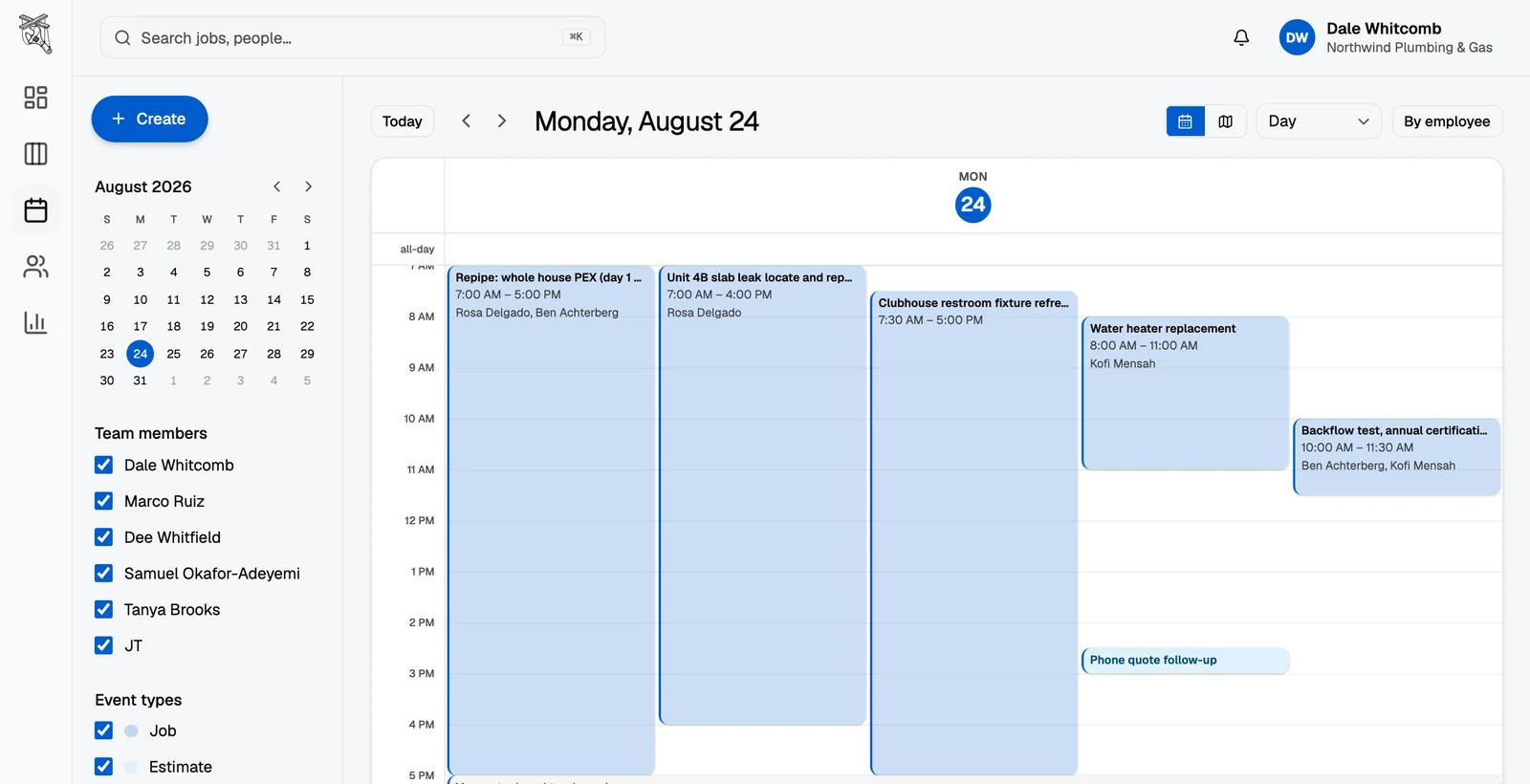
Drag visits onto the calendar, assign crew members, and give everyone a live view of the day. No more morning phone tag.
Online booking
A booking page for your business that drops requests straight onto your schedule instead of into your voicemail.
Email inbox
Connect your email and the messages about your jobs land in one place, tied to the customer they belong to.
Your AI tools
Connect the AI you already use and ask it about jobs, customers, and the schedule. Crewfather speaks MCP, so any client that does too can plug in.
Job boards & pipeline
Track every job from lead to paid on a board you can actually drag. Nothing slips between a quote and a done job.
Contacts & properties
Every customer, property, and conversation in one record, so anyone on the crew can pick up where the last person left off.
Job photos
Before-and-after photos live on the job record, not in somebody's camera roll. The office sees what the field sees.
Inventory & stock
Know what is on the truck and what is left in the shop. Confirm what the job used, and reorder when you hit the line you set.
Quotes & invoices
Turn a job into a quote, a quote into an invoice, and an invoice into money, with a price book that keeps line items consistent.
QuickBooks® sync
Customers, invoices, and payments stay in step with QuickBooks Online on their own. No export night, no double entry.
Card payments
Invoices carry a pay-online link, so customers pay by card and every payment lands on the job it belongs to.
Review requests
When a job wraps, Crewfather follows up and asks the customer for a review with your link. Reputation on autopilot.
Intuit and QuickBooks are registered trademarks of Intuit Inc. Intuit has not reviewed or approved this page or its contents. Crewfather is not affiliated with or endorsed by Intuit Inc.
Scheduling
Plan the week in minutes, not evenings
Build the schedule once and let it travel: the office sees the calendar, the crew pulls up their day on their phones, and customers get their visit without the back-and-forth.
- Day, week, and crew views of the same schedule
- Recurring visits generated automatically from service agreements
- Assign a visit and it lands on that crew member's day
Jobs
Every job, from first call to paid
Jobs move across a board, not through your memory. Quote it, schedule it, finish it, invoice it, and see exactly where every dollar in the pipeline is standing.
- Drag jobs between stages you define
- Quotes and invoices generated from the job itself
- A client portal where customers approve quotes and pay
Industries
Built for crews that work outside
If your business runs on visits, routes, and repeat customers, Crewfather fits the way you already work.
Built for the field
The office and the truck, finally on the same page
Crewfather was built for how service businesses actually run: one person quoting in the office, three people working out of trucks, and customers who just want to know when you’re coming.

Works from the truck
Pull up a job in any phone browser, check the details, and add a note. Nothing to install, for you or your customer.
Client portal
Customers approve quotes, check visits, and pay invoices from a link. No account required.
Roles & permissions
Owners run the business, the crew runs the work. Field accounts never see what a job costs you or what you make on it, and subcontractor accounts see no pricing at all.
Your AI, connected
Ask about the schedule from inside the app on Pro, or plug in the AI you already use. Same jobs, same customers, same day.
Pricing
Simple pricing that scales with the crew
Every plan starts with a 14-day free trial. No credit card required, cancel anytime.
Starter
For solo operators getting organized.
$49USD / month per organization
billed yearly, or $59 USD billed monthly
Save 17% versus monthly
$59USD / month per organization
billed monthly, or $49 USD billed yearly
Switch to yearly and save 17%
- Job boards & pipeline
- Contacts & conversations
- Calendar & scheduling
- Inventory & stock
- Up to 3 team members
Pro
For growing crews that live in the app.
$99USD / month per organization
billed yearly, or $119 USD billed monthly
Save 17% versus monthly
$119USD / month per organization
billed monthly, or $99 USD billed yearly
Switch to yearly and save 17%
- Everything in Starter
- AI assistant & smart email replies
- Email inbox sync
- Reports & time tracking
- Unlimited team members
Compare the plans
| Feature | Starter | Pro |
|---|---|---|
| Team members | Up to 3 | Unlimited |
| Job boards & pipeline | Included | Included |
| Contacts & conversations | Included | Included |
| Calendar & scheduling | Included | Included |
| Inventory & stock | Included | Included |
| AI assistant & smart email replies | Not included | Included |
| Email inbox sync | Not included | Included |
| Reports & time tracking | Not included | Included |
No lock-in
Easy to start, easy to reach, easy to leave
Three things that hold on every plan. Each one links to the page that commits to it.

Start today, decide later
Every new workspace gets the whole product on a free trial, with no card to start. If you decide against it there is nothing to cancel.
See the plans →A person answers
Email or the chat bubble reaches someone on our team, during US business hours.
How to reach us →Your records leave with you
Ask us and we will export your business records, and you can delete what you no longer want. The privacy policy spells out what deletion does and what we keep.
Read the policy →
FAQ
Questions, answered
Do I need a credit card to try Crewfather?
No. Every new organization gets a 14-day free trial with full access. You only add a card when you decide to keep going.
Does it work in the field?
Yes. Crewfather runs in any browser, including on a phone, so you can pull up a job and add a note from the truck. Your customers never install anything either.
How does pricing work for my team?
Plans are per organization, not per seat. Starter covers up to 3 team members; Pro removes the limit entirely.
Can customers see their jobs?
Each customer gets a portal link where they can approve quotes, see upcoming visits, and pay invoices. No login or app install needed.
I already use Jobber, Housecall Pro, or a spreadsheet. What happens to my data?
Your customer list comes with you: export it from your current system (CSV works fine), send it to support@crewfather.com during your trial, and we import it for you, free, with a row-by-row report of what landed. Past job history stays in your old system for now; we would rather tell you that plainly than promise a migration that drops the details.
Can I cancel anytime?
Yes. Subscriptions are month-to-month and you can cancel from the billing page whenever you like.
Can I connect the AI I already use?
Yes. Crewfather speaks MCP, so you can point the AI you already use at your workspace and ask it about jobs, customers, and the schedule. Setup lives under Settings, Developer, MCP. The in-app assistant is separate, and is part of Pro.
Can I track inventory on the trucks?
Yes. Keep quantity for the shop and each truck, confirm what a job actually used, and reorder when you hit the line you set. Draft purchase orders group by supplier; nothing emails a supplier until you send it.
Ready to run your crew like family?
Set up your organization in minutes and see this week on one screen.
14-day free trial · No credit card required